This issue has been addressed in the following versions of Citrix Secure Access client for Ubuntu:
23.5.2 and later releases
Citrix recommends that customers who are affected by the above vulnerability upgrade the Citrix Secure Access client for Ubuntu installed on their endpoints by taking the following actions as soon as possible:
If Citrix Secure Access client for Ubuntu is distributed via the SSL VPN upgrade control feature of Citrix ADC or Citrix Gateway:
Check the versions of Citrix Secure Access client for Ubuntu that are being distributed by each Citrix ADC or Citrix Gateway instance. This can be done by viewing the file located at /var/netscaler/gui/vpn/scripts/linux/clientversions.xml. If it is a vulnerable version, customers must:
Citrix thanks Rilke Petrosky of F2TC Cyber Security for working with us to protect Citrix customers.
What Citrix is Doing
Citrix is notifying customers and channel partners about this potential security issue through the publication of this security bulletin on the Citrix Knowledge Center at https://support.citrix.com/securitybulletins.
Obtaining Support on This Issue
If you require technical assistance with this issue, please contact Citrix Technical Support. Contact details for Citrix Technical Support are available at https://www.citrix.com/support/open-a-support-case.
Subscribe to Receive Alerts
Citrix strongly recommends that all customers subscribe to receive alerts when a Citrix security bulletin is created or modified at https://support.citrix.com/user/alerts.
Reporting Security Vulnerabilities to Citrix
Citrix welcomes input regarding the security of its products and considers any and all potential vulnerabilities seriously. For details on our vulnerability response process and guidance on how to report security-related issues to Citrix, please see the following webpage: https://www.citrix.com/about/trust-center/vulnerability-process.html.
Disclaimer
This document is provided on an «as is» basis and does not imply any kind of guarantee or warranty, including the warranties of merchantability or fitness for a particular use. Your use of the information on the document is at your own risk. Citrix reserves the right to change or update this document at any time. Customers are therefore recommended to always view the latest version of this document directly from the Citrix Knowledge Center.
This issue has been addressed in the following versions of the Citrix Secure Access client for Windows:
23.5.1.3 and later releases
Citrix recommends that customers who are affected by the above vulnerability upgrade the Citrix Secure Access client for Windows installed on their endpoints by taking the following actions as soon as possible:
If Citrix Secure Access client for Windows is distributed via the SSL VPN upgrade control feature of Citrix ADC or Citrix Gateway:
Check the versions of the Citrix Secure Access client for Windows that are being distributed by each Citrix ADC or Citrix Gateway instance. This can be done using either GUI (instructions at: https://www.citrix.com/downloads/citrix-gateway/plug-ins/citrix-secure-access-client-for-windows.html) or by viewing the file located at /var/netscaler/gui/vpn/pluginlist.xml. If it is a vulnerable version, customers must:
Citrix has identified an isolated issue in which some customers experienced a crash condition after upgrading to the current build with HTTP/2 enabled.
What Product is Affected?
NetScaler appliance upgraded to version NS13.1 Build 45.63 or NS13.0 Build 90.11
*No other versions are impacted by this HTTP/2 issue.
Is there a workaround or fix?
Workaround: Disable http2 in the HTTP profile bound to the virtual server.
Fix: Engineering is working on a code fix and will update the ETA of the next build as soon as possible.
How to verify if http2 is enabled?
Run the following command from the CLI and verify if http2Direct Is reported as enabled.
> show run | grep http2
Example of output if enabled:
> set ns httpProfile <name of httpprofile> -http2 ENABLED -http2Direct ENABLED
Example of output if not enabled:
> set ns httpProfile <name of httpprofile> -http2 DISABLED -http2Direct DISABLED
How to disable http2 if enabled?
> set ns httpProfile <name of the httpprofile> -http2 DISABLED -http2Direct DISABLED
Citrix published on May, 9th a new Security Bulletin for NetScaler ADC and Netscaler Gateway. The severity is rated as medium. AXACOM is recommending to upgrade the NetScaler ADCs and Gateways in the next few days according to the Citrix CTX477714.
Please monitor as well the Citrix CTX article under the following link:
Vulnerabilities have been discovered in Citrix ADC and Citrix Gateway listed below, that, if exploited, could result in the following security issues:
Impacted Products, Versions and Components
The following supported versions of Citrix ADC and Citrix Gateway are affected by this vulnerability:
Citrix ADC and Citrix Gateway 13.1 before 13.1-45.61
Citrix ADC and Citrix Gateway 13.0 before 13.0-90.11
Citrix ADC and Citrix Gateway 12.1 before 12.1-65.35
Citrix ADC 12.1-FIPS before 12.1-55.296
Citrix ADC 12.1-NDcPP before 12.1-55.296
This bulletin only applies to customer-managed Citrix ADC and Citrix Gateway. Customers using Citrix-managed cloud services or Citrix-managed Adaptive Authentication do not need to take any action.
CVE ID
Description
Pre-requisites
CWE
CVSS
CVE-2023-24488
Cross site scripting
Appliance must be configured as a Gateway (SSL VPN, ICA Proxy, CVPN, RDP Proxy) OR AAA virtual server
Affected customers of Citrix ADC and Citrix Gateway are recommended to install the relevant updated versions of Citrix ADC or Citrix Gateway as soon as possible:
Citrix ADC and Citrix Gateway 13.1-45.61 and later releases
Citrix ADC and Citrix Gateway 13.0-90.11 and later releases of 13.0
Citrix ADC and Citrix Gateway 12.1-65.35 and later releases of 12.1
Citrix ADC 12.1-FIPS 12.1-55.296 and later releases of 12.1-FIPS
Citrix ADC 13.1-FIPS 13.1-37.150 and later releases of 13.1-FIPS
Citrix ADC 12.1-NDcPP 12.1-55.296 and later releases of 12.1-NDcPP
A vulnerability has been discovered in Citrix Gateway and Citrix ADC, listed below, that, if exploited, could allow an unauthenticated remote attacker to perform arbitrary code execution on the appliance.
CVE-ID
Description
CWE
Affected Products
Pre-conditions
CVE-2022-27518
Unauthenticated remote arbitrary code execution
CWE-664: Improper Control of a Resource Through its Lifetime
Citrix Gateway, Citrix ADC
Citrix ADC or Citrix Gateway must be configured as a SAML SP or a SAML IdP
The following supported versions of Citrix ADC and Citrix Gateway are affected by this vulnerability:
Citrix ADC and Citrix Gateway 13.0 before 13.0-58.32
Citrix ADC and Citrix Gateway 12.1 before 12.1-65.25
Citrix ADC 12.1-FIPS before 12.1-55.291
Citrix ADC 12.1-NDcPP before 12.1-55.291
Citrix ADC and Citrix Gateway version 13.1 is unaffected.
What Customers Should Do
Exploits of this issue on unmitigated appliances in the wild have been reported. Citrix strongly urges affected customers of Citrix ADC and Citrix Gateway to install the relevant updated versions of Citrix ADC or Citrix Gateway as soon as possible:
Citrix ADC and Citrix Gateway 13.0-58.32 and later releases
Citrix ADC and Citrix Gateway 12.1-65.25 and later releases of 12.1
Citrix ADC 12.1-FIPS 12.1-55.291 and later releases of 12.1-FIPS
Citrix ADC 12.1-NDcPP 12.1-55.291 and later releases of 12.1-NDcPP
Please note that Citrix ADC and Citrix Gateway versions prior to 12.1 are EOL and customers on those versions are recommended to upgrade to one of the supported versions.
Kunden, die auf ihrem NetScaler Kerberos verwenden, bekommen nach dem Microsoft November Update ein Problem. Kerberos funktioniert danach nicht mehr mit dem NetScaler und auch weitere Umsysteme sind davon betroffen. Sie erhalten bei einem Login Versuch via NetScaler folgenden Eintrag im System Eventlog des Domain Controllers:
While processing an AS request for target service <service>, the account <account name> did not have a suitable key for generating a Kerberos ticket (the missing key has an ID of 1). The requested etypes : 18 3. The accounts available etypes : 23 18 17. Changing or resetting the password of <account name> will generate a proper key.
ACHTUNG: Diese Anpassungen sind nur als Workaround zu verstehen und sollten wieder rückgängig gemacht werden, sobald Microsoft einen Fix für den Fehler bereitstellt!
UPDATE 18.11.2022
Microsoft hat ein OOB Update für Domain Controller veröffentlicht, welches das oben beschriebene Problem löst.
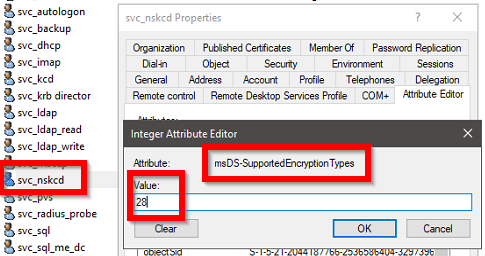
Nach der Installation des Updates auf allen Domain Controllern ist es möglich RC4 wieder vom KCD Account zu entfernen (Attribut: msDS-SupportedEncryptionTypes, Value: 24) und falls gesetzt, den Reg Key «KrbtgtFullPacSignature» wieder zu entfernen.